Connect using the following settings:
Protocol: FTP
Host: ftps.mosaicdatatracking.com
Port: 990 (TLS Implicit)
Username and password are required.
Here is an exmaple of how to configure WinSCP.
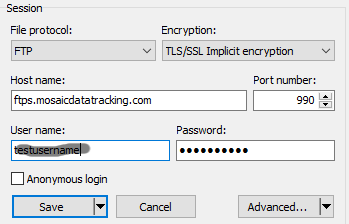
Here is an exmaple of how to configure FileZilla.

To access data via FTPS, first download and install a free client such as WinSCP or FileZilla Client.
Connect using the following settings:
Protocol: FTP
Host: ftps.mosaicdatatracking.com
Port: 990 (TLS Implicit)
Username and password are required.
Here is an exmaple of how to configure WinSCP.
Here is an exmaple of how to configure FileZilla.
Contact Peter Oven at 814-336-1284 for technical support.
Powered by Mosaic Data Tracking, a service of WES Energy & Environment, LLC.